

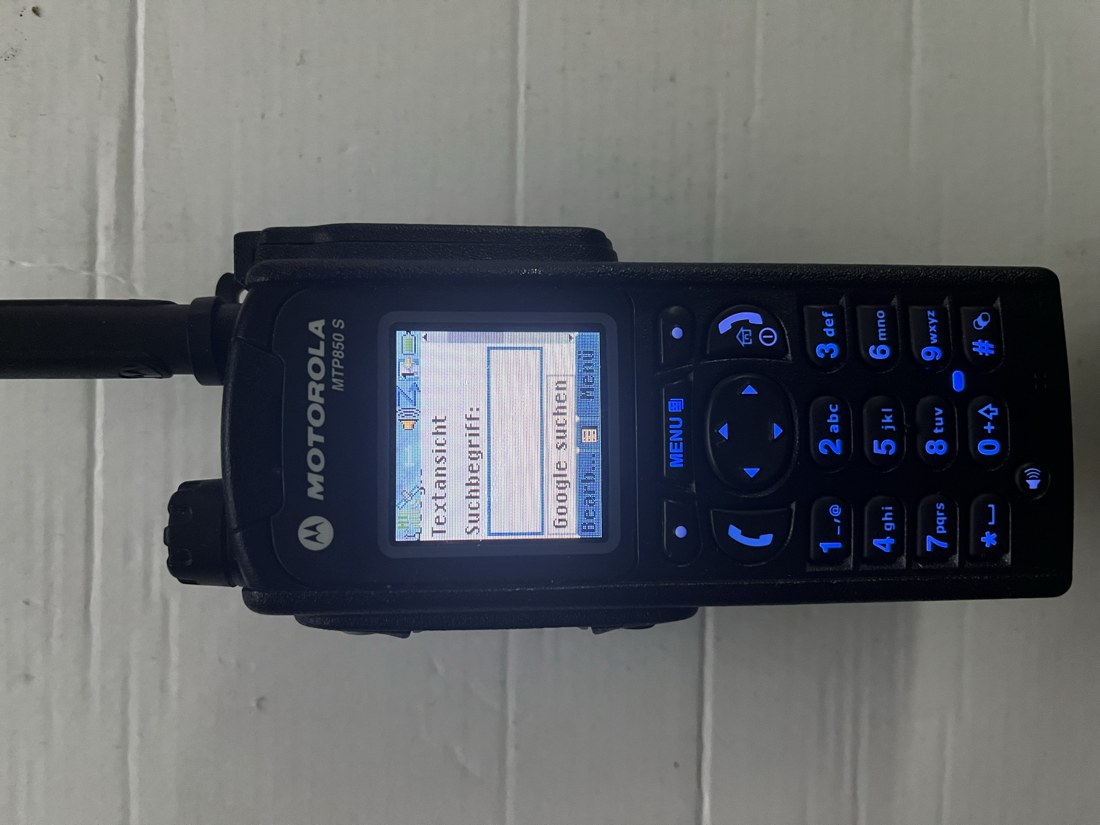
The MTP850 opens a small colour homepage through the TMO cell. The Pi fetches modern websites and converts them into a compact handheld view. Included in Pro 0.5.25; existing full Pro licences remain valid.
From the web to the radio
Website → browser on the Pi → text, links and search fields → WAP gateway → TETRA packet data → MTP850.
Regular websites use the Pi’s existing internet connection; no VPN is needed. Optionally, Chromium executes JavaScript and waits briefly for dynamically loaded content. The resulting page is reduced to less than 8 KiB. Images, scripts and video are not transmitted over the radio link.
1. Install the complete package
From 0.5.24, update to 0.5.25 through the signed web interface update. New installations and upgrades from older versions require the full installer for the radio stack, Kannel, Chromium and gateway services. Back up settings and stop radio operation first; the installer does not start transmission. Download and installation.
Enable Packet data (Pro) and Advanced Link for packet data (Pro) in the cell parameters. Gateway services start with the next deliberate cell start. TS4 is reserved while packet data is enabled; voice calls use the remaining voice slots.
2. Codeplug and browser
| Setting | Tested value |
|---|---|
| Browser homepage | http://172.30.85.1/ |
| WAP proxy | 172.30.85.1 |
| Proxy port | 9201 |
| Packet Data: User Authentication | off |
| IP address | dynamic |
| Default data mode | Voice&Data |
| Cache when checking new pages | off |
| PEI baud rate / parity | 9600 / none |
9600 baud describes the external PEI interface, not measured radio throughput. The gateway uses MTU 576 and local handset addresses from 172.30.85.10 to .29. Settings must match the radio and its codeplug.
3. Configure WAP in the web panel
In WAP, explicitly enable internet access and set the internet start address and fetch limits. Test internet uses the same converter as the handset. Enable Load all external websites with JavaScript on the Pi for dynamic pages. Internet and JavaScript are off by default.
Under WAP → Portal / Homepage, edit the callsign/title, greeting, location, description, colour/text view and up to three menu items. Select Internet as one destination. Save and reload Home on the radio; the panel preview is approximate. The local homepage also works without an internet connection.
What can be converted?
Visible text, links and simple GET search forms are retained. JavaScript rendering applies generally to external HTTP/HTTPS pages. Chromium runs in a short-lived isolated session, after which cookies and the session are discarded. HTTPS certificates are checked on the Pi, and local LAN destinations remain blocked. Fetch time and size are limited, with at most 16 MiB of browser traffic and one browser instance at a time.
Modern web applications do not become fully usable on the MTP850. Logins, POST forms, uploads, canvas and complex buttons are not generally supported. Long text is truncated. Rendering needs additional memory; the running setup was checked on a Pi 4 with 8 GB RAM.
During testing, Google returned an unusual-traffic check. JavaScript does not remove provider blocks. The response is shown; Bing text search is an explicit alternative, not a hidden provider switch. Wikipedia was successfully fetched through the gateway with text and rewritten links.
Add Hamnet later
Hamnet is an IP network. The Pi can also convert reachable HTTP/HTTPS pages there into WAP. Optional settings cover a Hamnet router or HamCloud IKEv2. Regular internet works independently. A real Hamnet/VPN connection has not yet been configured or tested in this setup.
Validation and backup
Colour pages, separate menu lines and the search field were confirmed on the MTP850. 39 browser/gateway tests and 15 WAP requests passed, along with package verification and a compiled ARM64 startup check. A clean Pro installation followed by handheld RF acceptance, simultaneous voice use by the same handset while assigned to packet data, and actual radio throughput remain unverified.
From 0.5.25, JSON backup format 3 includes cell configuration and hotspot password, talkgroups with GPS routing, TX calibration, the DMO profile, subscriber restrictions, the WAP portal, internet/Hamnet settings including saved VPN credentials and GPS control preferences. Use Advanced → Back up configuration to save a backup on the Pi; Download backup exports it. With no backup selected, it downloads the current state. Import backup file restores a downloaded file. Stop the radio cell and Hamnet/VPN first. The existing state is backed up; a restore error rolls back the affected files. Neither transmitter nor VPN is started. Downloads contain passwords and must be kept confidential.
Older JSON and TOML backups remain readable and leave settings they do not contain unchanged. Wi-Fi profiles, the operating system, licence, radio autostart and runtime limits are excluded. Pro features still require the appropriate licence. Public exports do not contain private Si570 hardware calibration. Create a new backup after updating; existing backup files are not expanded retroactively.
Download Pro · Pro features · GPS control measured with HackRF