
New in 0.6.1: Call-Out, Dispatcher and themes
Pro: Native Motorola Call-Out to individual local radios, response tracking and automatic clearing of simple alerts. Alert reception, acceptance, rejection and automatic clearing were tested on the operator’s radio. Other models, held alerts and information exchange still need on-air verification.
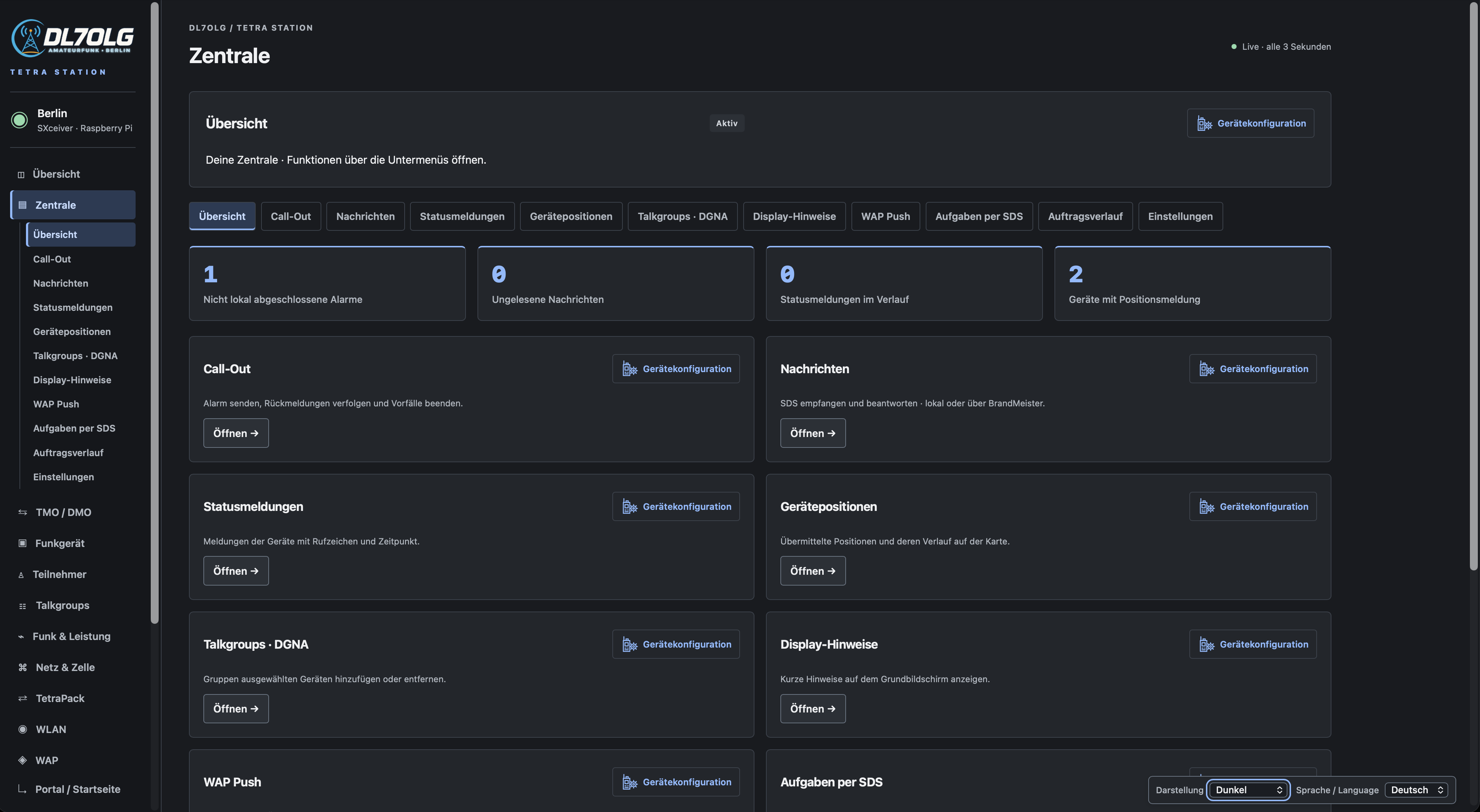
Dispatcher sits directly below Overview, with its own dashboard, submenus, compact alert cards, search and filters. The Radio configuration icon opens a separate guide with CPS Plus 7.9 paths, field names and values.
Basic and Pro: Choose Light, Dark or Radio equipment appearance, saved in your browser. Local private voice calls between two registered handhelds remain available in both editions. Pro adds duplex, inbox, status, locations, DGNA, display notices, WAP Push and the expanded portal editor.
Local duplex speech in both directions was confirmed on air. Concurrent network/local traffic and the other terminal features require separate checks. Existing BrandMeister browser private calls and network SDS remain available; this extension adds no new handheld-to-BrandMeister private voice route.
Dispatcher setup and limitations · Pro demo with simulated Call-Out
Set up dispatch
- Select TMO mode and enable the centre under Dispatcher → Settings. Choose an unused local subscriber ID (default 80).
- Send handheld text messages and status reports to that ID. Add names and status labels as
number = label. Location display requires the handheld to transmit GPS-LIP reports; map points show the reported location, age and available accuracy. - Choose Open and reply to read an incoming message. Only this deliberate action can trigger a requested read receipt. Background refresh does not mark messages as read.
- Enable Pro duplex when needed. Two free voice slots are required. A private simplex call between handhelds does not require the Dispatcher.
Radio actions
- DGNA: add or remove a selectable group. A matching radio response is shown separately; an unconfirmed request is not success. A programmed group may only be detached, not deleted.
- Home display: up to 24 characters; protocol ID (default 220) must match the codeplug. An empty notice requests removal. Submission alone does not prove display.
- WAP Push: requires a current packet-data context and terminal support. Packet submission does not prove the link was opened.
- SDS task: an ordinary text message with a reply code. Replies use
CODE JAorCODE NEINand must come from the addressed device. This does not activate Motorola Call-Out.
Native Call-Out
For amateur radio, this is an additional option, for example to try task notifications with acceptance or rejection during an emergency communications exercise. The Call-Out demonstrates the technical capability; group calls, private calls and messages remain the cell’s everyday uses.
Open Dispatcher → Call-Out → Create an alert. Select a locally registered radio, a severity matching its programming and up to 120 Latin-1 characters. Leave Keep the radio alert active until cleared off for a simple alert. Recognized acceptance or rejection triggers one automatic Clear; held alerts offer information and manual Clear. Transmission status and the radio’s response remain separate. A locally closed incident alone does not prove the radio cleared it.
Call-Out must be enabled on the terminal and the Dispatcher sender ID allowed where its profile requires it. The gear-and-radio icon opens the CPS Plus 7.9 instructions. The current subset is individual local alerts; group alerts, multipart text and universal Motorola compatibility are not claimed. The response window is 15 minutes; expiry does not clear a radio alert. Ordinary SDS tasks remain a separate feature.
Messages and BrandMeister
Automatic routing keeps registered recipients local. Offline IDs in the local range are never redirected to the network. Existing BrandMeister browser private calls and network SDS remain available; this release does not add handheld-to-BrandMeister private voice routing.
Local dispatch uses its own ID. Network messages retain the station's existing network identity. When that identity also belongs to a registered physical radio, that radio keeps its established receive path; dispatch does not request ambiguous receipts. Queued means submitted. Delivered and Read require a matching radio report. Ambiguous timeouts never cause automatic retransmission of user messages.
Portal and storage
Edit up to 24 HTTP/HTTPS links with your own labels and ordering. Choose greeting first, links first or links only. Radios receive six links per page with next/back navigation. The preview is approximate. Existing internet/Hamnet access restrictions still apply; old three-link configurations remain compatible.
Settings, contacts and status labels are included in configuration backups. Messages and position history stay in the local database and are excluded from that export. Retention is configurable from 1 to 365 days (default 30); references remain reserved for at least seven days to prevent false receipt matches.
Verification and remaining checks
Protocol, Basic/Pro restrictions, the ARM64 package and both demo interfaces have been checked. Native alert reception, Accept/Reject and automatic clearing of a simple alert were confirmed on the operator’s radio.
On 20 November the operator confirmed acceptance and audible speech on both handhelds in a duplex call, using an external microphone. Recorded signalling shows duplex setup and release. Concurrent network/local audio and the additional terminal features still require testing with the actual programmed radios.
Update
From 0.6.0 to 0.6.1, use the signed web panel update under Advanced → Update web panel. New installations and older releases require the full installer. Back up settings and stop the cell first. Licences and configuration are preserved; the installer does not start transmission.